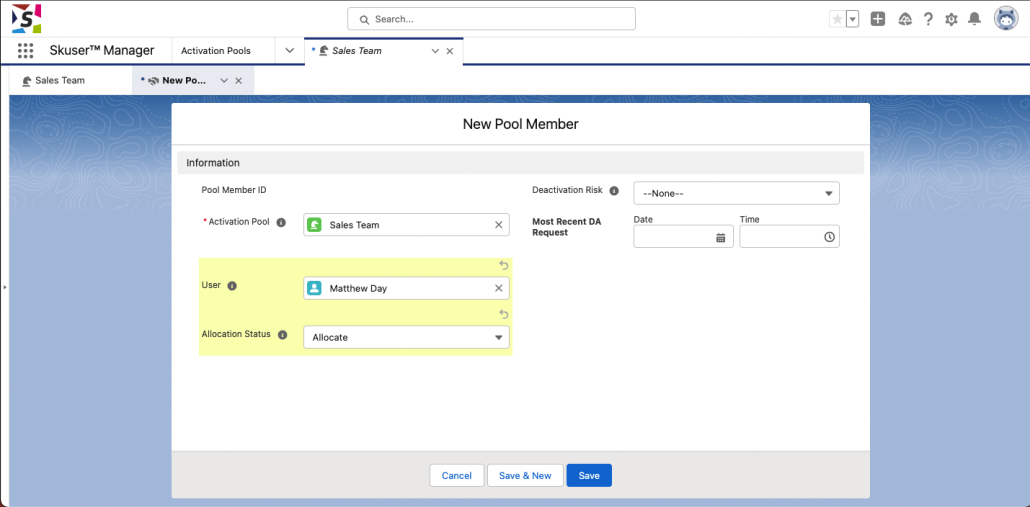

The Pool Member object is a junction object between the Skuser packaged User Pool object and Salesforce standard User object.
Creating a Pool Member record gives a correctly Skuser-licensed Salesforce User (whether currently active or inactive) the ability to manage their activation status with other Pool Members in the same User Pool.
Setting a Pool Member’s Allocation Status picklist to ‘Allocate’ means that that the associated Salesforce User may take part in the activation/deactivation process within the associated User Pool.
Setting the Allocation Status to ‘Do Not Allocate’ means that the associated Salesforce User will not take part in the activation/deactivation process within the associated User Pool.
If you create a Pool Member record for a Salesforce User that has not been allocated a Skuser User License, then that Salesforce User will not be able to manage their activation status in any User Pool until they are allocated a Skuser User License.
Creating and Maintaining Pool Member records
Prior to creating a Pool Member record for a User, make the user active from the user’s Detail page. This is required due to a limitation in Salesforce where you are not permitted to populate a lookup with an inactive user. The Skuser Team are investigating ways to workaround this Salesforce limitation.
-
- Create a Pool Member record by visiting a User Pool page and pressing the ‘New’ button on the Pool Member related list.
-
- Populate the User lookup field with the Salesforce User that you wish to take part in the activation/deactivation process in this User Pool.
-
- Set the Allocation Status of the Pool Member as ‘Allocate’.
-
- Leave the Deactivation Risk and Most Recent DA Request fields blank.
-
- Save the Pool Member record.